
-
1 - What the password?
you got a sample of rick’s PC’s memory. can you get his user password?
你得到了Rick的电脑内存样本。你能获取他的用户密码吗?
先imageinfo判断系统版本
vol.py -f OtterCTF.vmem imageinfo
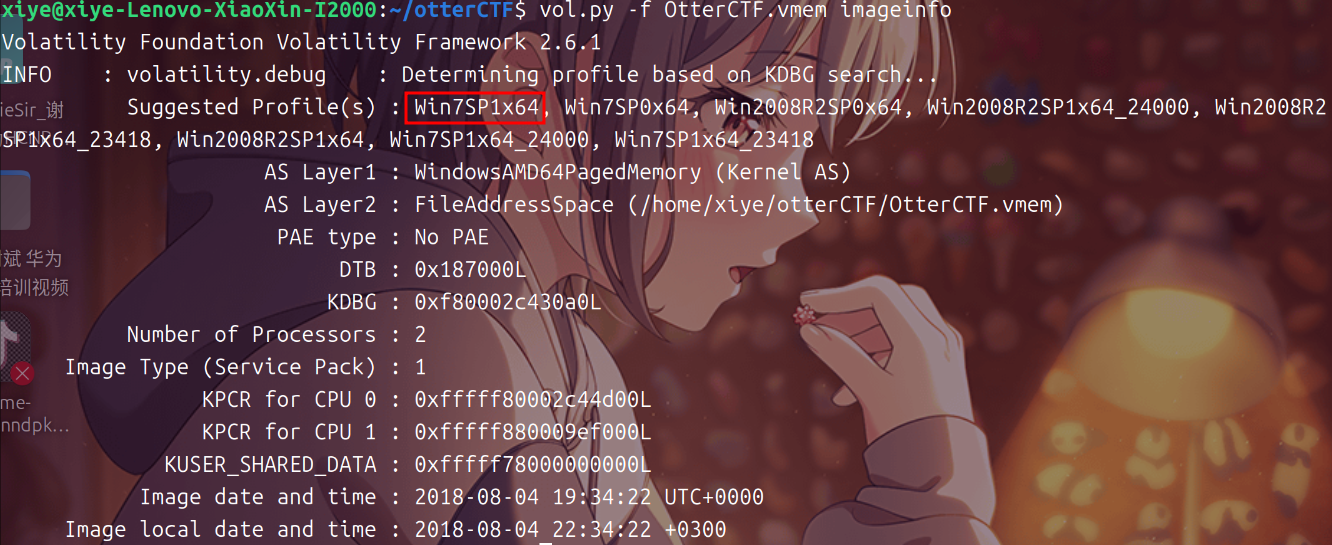
判断出系统后就可以用mimikatz找出密码了
vol.py -f OtterCTF.vmem --profile Win7SP1x64 mimikatz
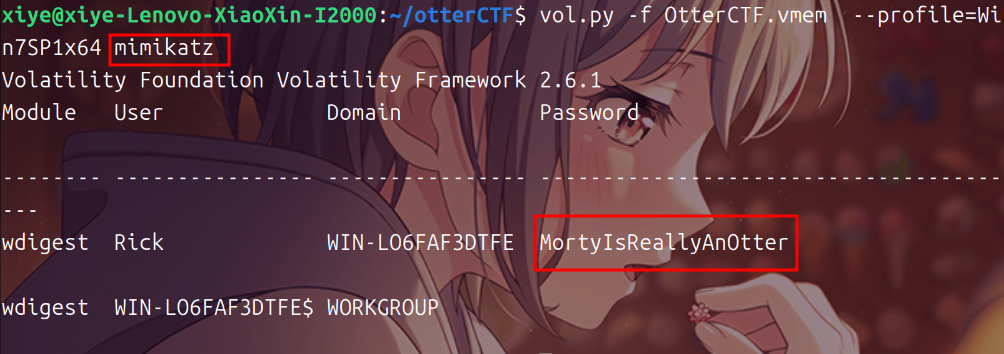
CTF{MortyIsReallyAnOtter}
找到主机名和ip,主机名在第一步就获取了,除了mimikatz之外,我们还可以用hivelist查看注册表文件
vol.py -f OtterCTF.vmem --profile=Win7SP1x64 hivelist
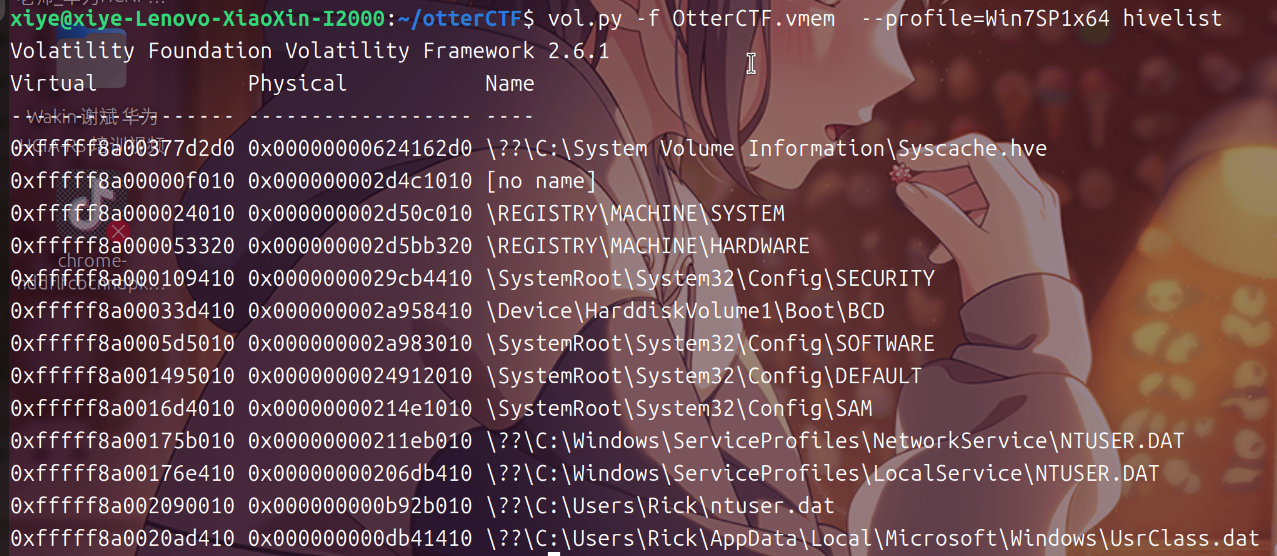
找到system 0xfffff8a000024010
vol.py -f OtterCTF.vmem --profile Win7SP1x64 printkey -o 0xfffff8a000024010 -K "ControlSet001\Control\ComputerName\ComputerName"
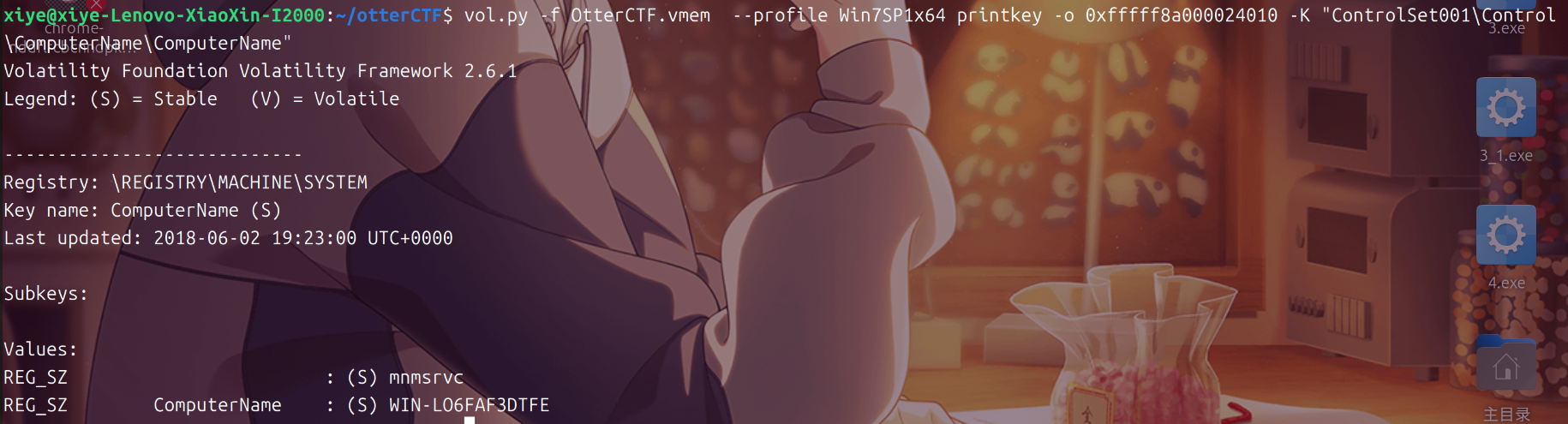
CTF{WIN-LO6FAF3DTFE}
使用netscan获取ip
vol.py -f OtterCTF.vmem --profile=Win7SP1x64 netscan
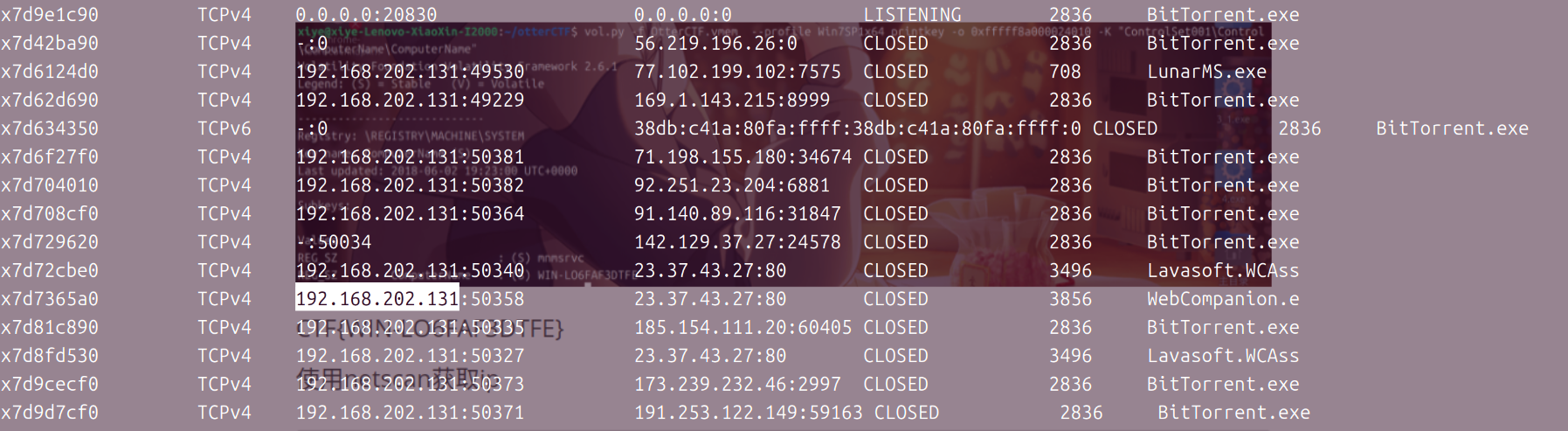
CTF{192.168.202.131}
-
3 - Play Time
Rick just loves to play some good old videogames. can you tell which game is he playing? whats the IP address of the server?
Rick非常喜欢玩一些老式的电子游戏。你能告诉我他在玩哪个游戏吗?服务器的IP地址是多少?
使用上一步的方法使用netscan查看ip
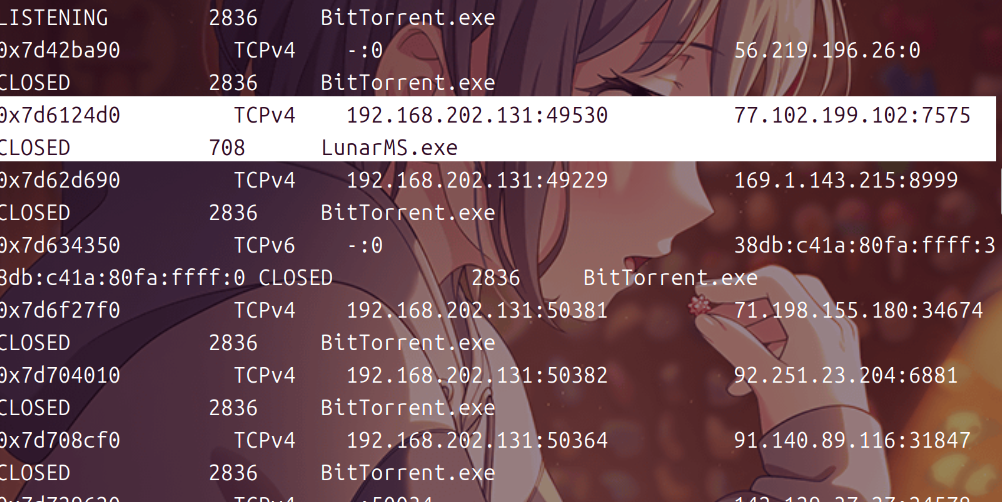
可以看到一个LunarMS.exe的程序,就是我们题目中的游戏
CTF{77.102.199.102}
CTF{LunarMS}
-
4 - Name Game
We know that the account was logged in to a channel called Lunar-3. what is the account name?
我们知道该账户已登录到名为Lunar-3的频道。账户名是什么?
用strings将OtterCTF.vmem 的文件中提取字符串内容,并将其输出到 OtterCTF中
strings OtterCTF.vmem > OtterCTF
查看OtterCTF,并且grep查找Lunnar-3字符串前后10行的内容
cat OtterCTF | grep -C 10 Lunar-3
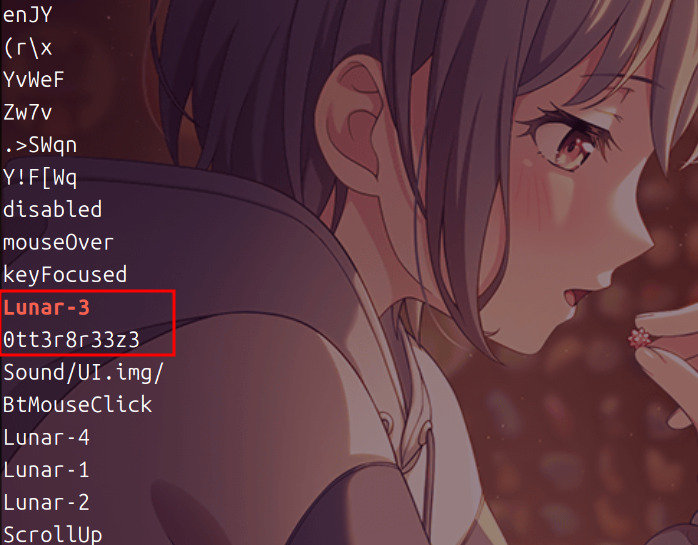
CTF{0tt3r8r33z3}
-
5 - Name Game 2
From a little research we found that the username of the logged on character is always after this signature: 0x64 0x??{6-8} 0x40 0x06 0x??{18} 0x5a 0x0c 0x00{2} What’s rick’s character’s name?
经过一点研究,我们发现登录角色的用户名总是在这个签名之后:0x64 0x??{6-8} 0x40 0x06 0x??{18} 0x5a 0x0c 0x00{2} ,那Rick的角色的名字是什么?
使用pslist查看进程
vol.py -f OtterCTF.vmem --profile=Win7SP1x64 pslist | grep -C 1 LunarMS.exe

memdump导出
vol.py -f OtterCTF.vmem --profile=Win7SP1x64 memdump -p 708 -D ./
使用010editer查看
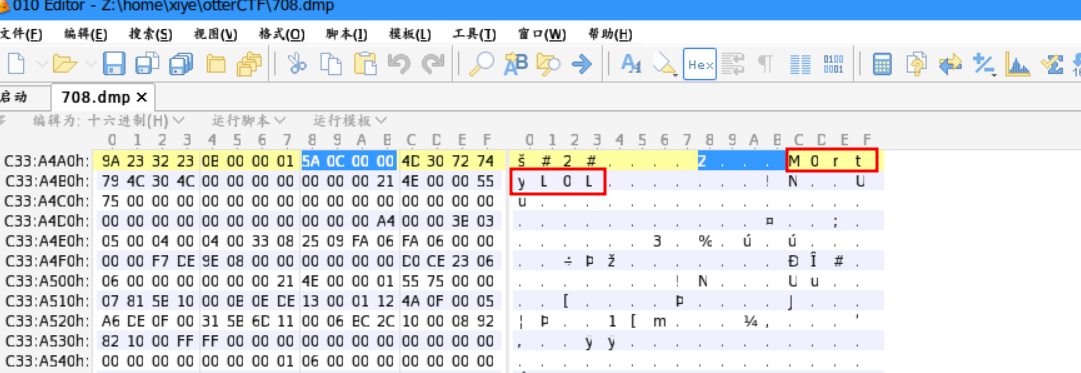
CTF{M0rtyL0L}
-
6 - Silly Rick
Silly rick always forgets his email’s password, so he uses a Stored Password Services online to store his password. He always copy and paste the password so he will not get it wrong. whats rick’s email password?
愚蠢的Rick总是忘记他的电子邮件密码,所以他使用在线存储密码服务来存储密码。他总是复制粘贴密码,这样他就不会弄错了。里克电子邮件的密码是什么?
使用clipboard获取粘贴板
vol.py -f OtterCTF.vmem --profile=Win7SP1x64 clipboard
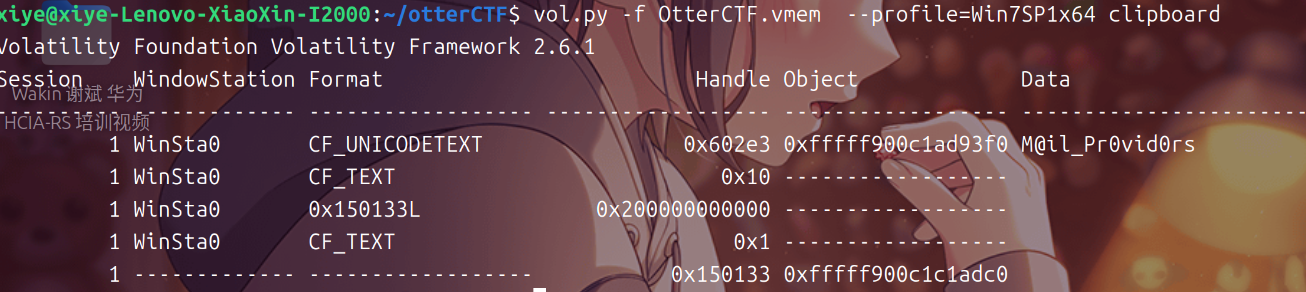
CTF{M@il_Pr0vid0rs}
-
7 - Hide And Seek
The reason that we took rick’s PC memory dump is because there was a malware infection. Please find the malware process name (including the extension)
BEAWARE! There are only 3 attempts to get the right flag!
我们取了Rick的PC内存转储的原因是因为存在恶意软件感染。请找到恶意软件的进程名称(包括扩展名)
注意!只有3次机会来获取正确的标志!
使用pslist查看可疑进程
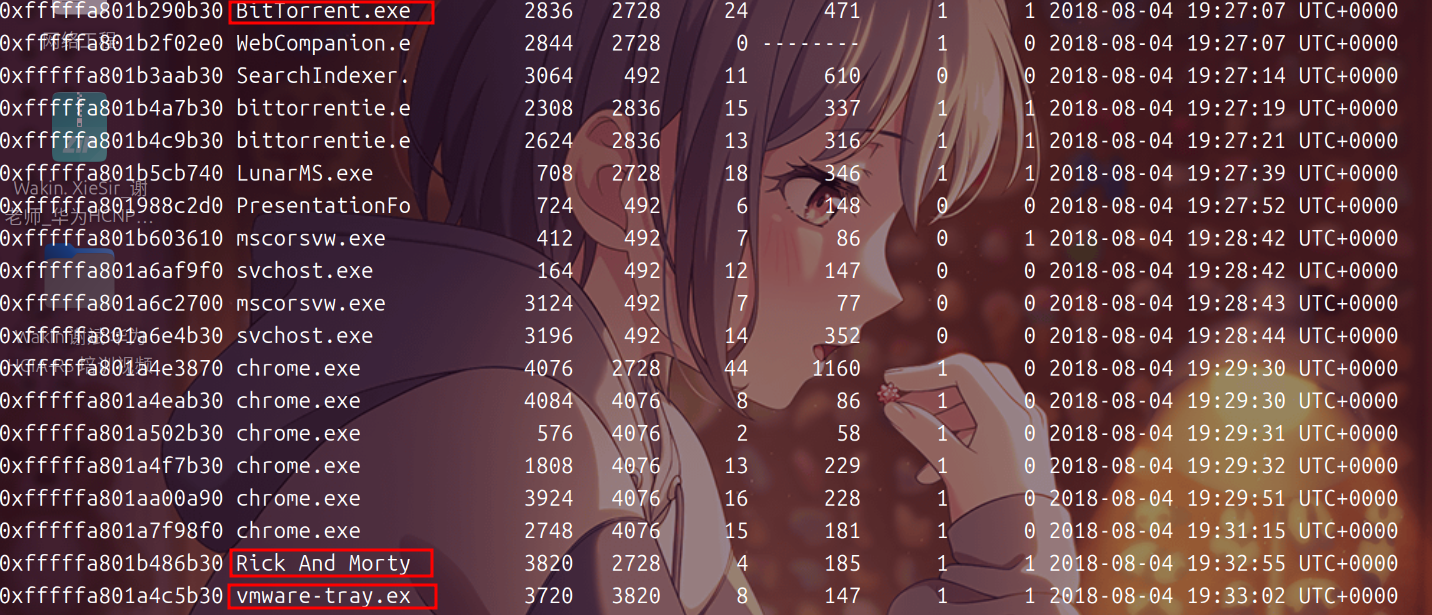
可以看到三个程序 BitTorrent.exe,Rick And Morty, vmware-tray.exe
vmware-tray.exe是Rick And Morty的子进程,很可疑
我们可以猜一下场景,Rick用bt下载器下载Rick And Morty动画片中毒了,病毒文件就是vmware-tray.exe(这件事告诉我们少看片:>)
CTF{vmware-tray.exe}
-
8 - Path To Glory
How did the malware got to rick’s PC? It must be one of rick old illegal habits…
恶意软件是如何进入Rick的电脑的?这一定是Rick那些老非法习惯之一…
下动画片中毒的,使用filescan搜索Rick And Morty
vol.py -f OtterCTF.vmem --profile=Win7SP1x64 filescan | grep "Rick And Morty"
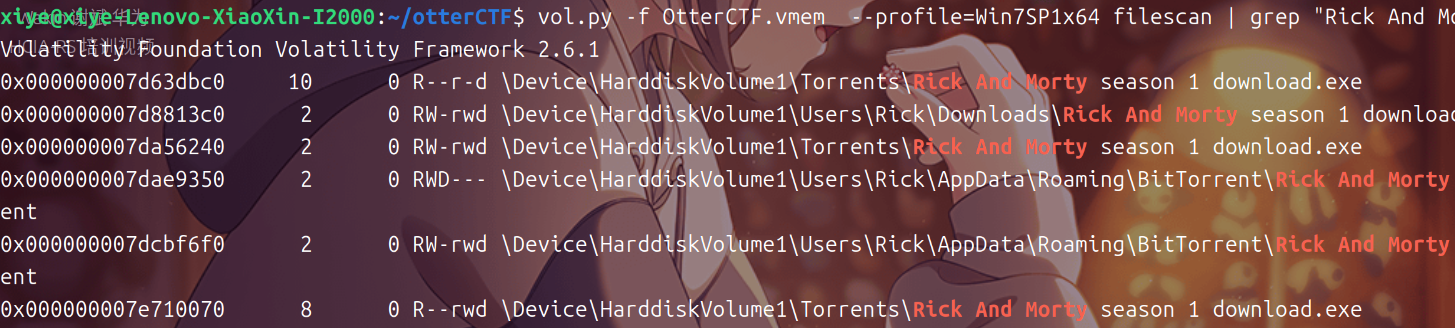
我们分析种子文件,将这三个种子文件导出到本地
vol.py -f OtterCTF.vmem  --profile=Win7SP1x64 dumpfiles -Q 0x000000007d8813c0 -D ./t
vol.py -f OtterCTF.vmem  --profile=Win7SP1x64 dumpfiles -Q 0x000000007dae9350 -D ./t
vol.py -f OtterCTF.vmem  --profile=Win7SP1x64 dumpfiles -Q 0x000000007dcbf6f0 -D ./t
用strings将导出的的3个文件中提取字符串内容,并将其输出到 1中
strings t/file.None.0xfffffa801af10010.dat t/file.None.0xfffffa801b42c9e0.dat t/file.None.0xfffffa801b51ccf0.dat > t/1
查看1后得到flag
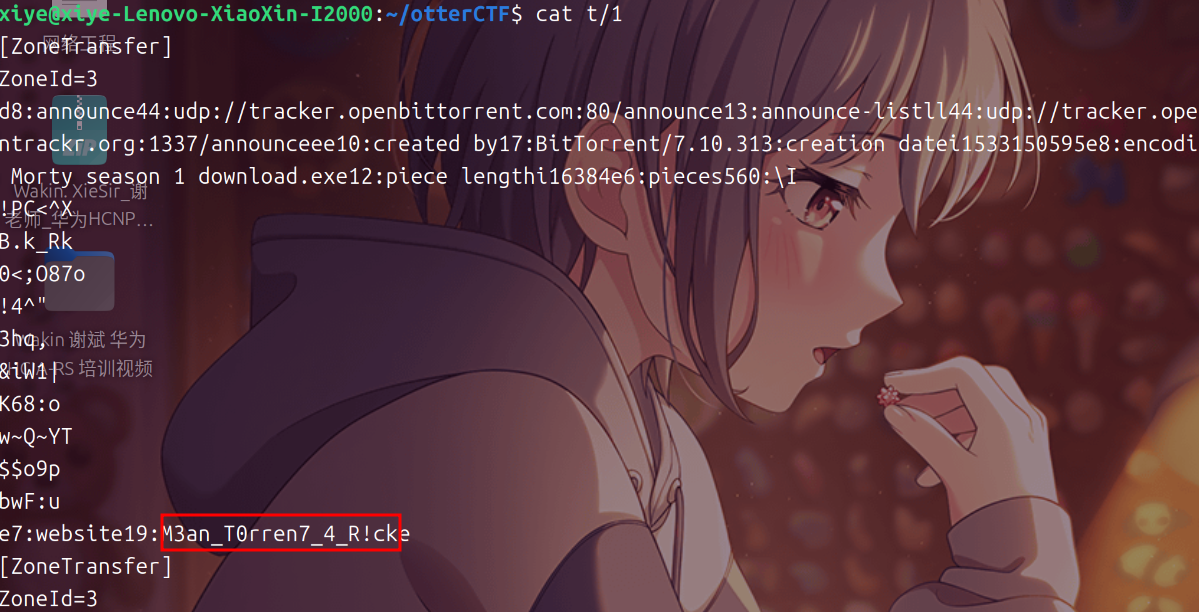
CTF{M3an_T0rren7_4_R!ck}
使用pslist列出进程,发现多项chrome.exe,可以判断出chrome.exe为主要浏览器
使用filescan搜索History并使用dumpfiles导出
vol.py -f OtterCTF.vmem  --profile=Win7SP1x64 filescan | grep History
vol.py -f OtterCTF.vmem  --profile=Win7SP1x64 dumpfiles -Q 0x000000007d45dcc0 -D ./chromehistory/


改后缀名sqlite,用sqlite3运行
mv chromehistory/file.None.0xfffffa801a5193d0.dat chromehistory/file.None.0xfffffa801a5193d0.sqlite
sqlite3 chromehistory/file.None.0xfffffa801a5193d0.sqlite
查询url和下载地址
select current_path, site_url from downloads;
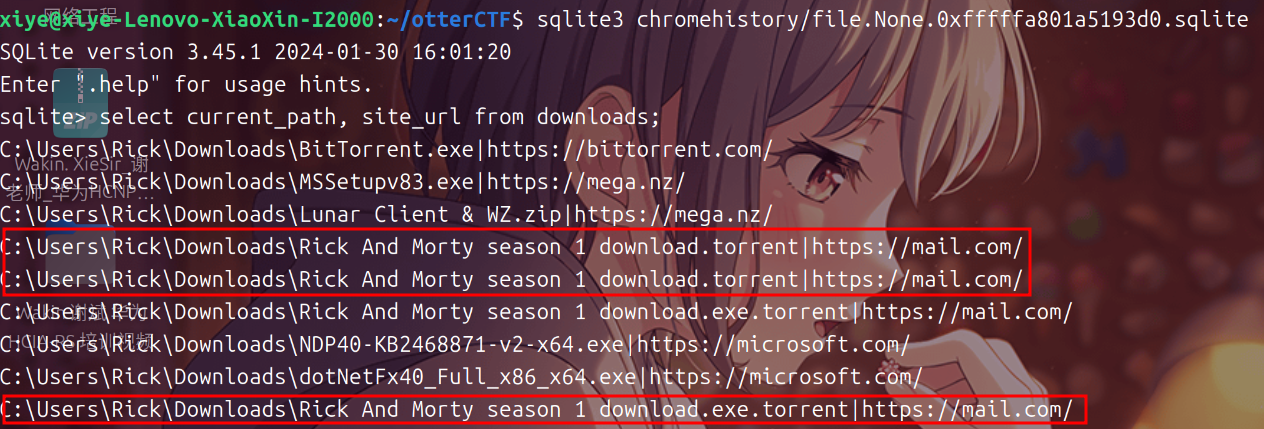
将内存中的chrome.exe 进程文件的文件提取出来
vol.py -f OtterCTF.vmem --profile=Win7SP1x64 memdump -n chrome.exe -D ./chrome/
随后用strings将提取文件中获取字符串内容,并将其输出到文本中
strings chrome/* > chrome/1
查找chrome/1中的“@mail.com”前后20行
cat chrome/1 | grep -C 20 "@mail.com"
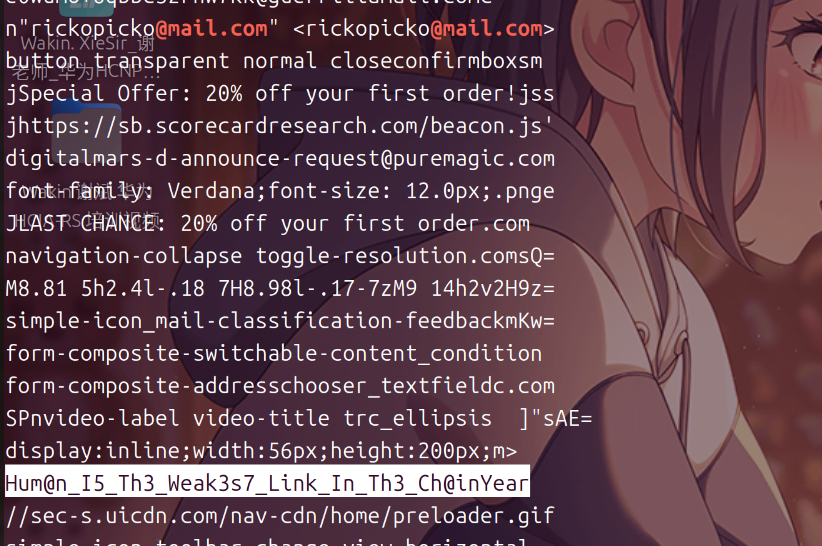
找到一串奇怪的字符串,获取flag
CTF{Hum@n_I5_Th3_Weak3s7_Link_In_Th3_Ch@in}
-
10 - Bit 4 Bit
We’ve found out that the malware is a ransomware. Find the attacker’s bitcoin address.
我们发现该恶意软件是勒索软件。找到攻击者的比特币地址。
将恶意软件的内存文件导出到本地
vol.py -f OtterCTF.vmem --profile=Win7SP1x64 memdump -p 3720 -D ./bit\ 4\ bit/
然后用 strings查找可疑内容
strings -el bit\ 4\ bit/3720.dmp | grep -C 10 Ransom
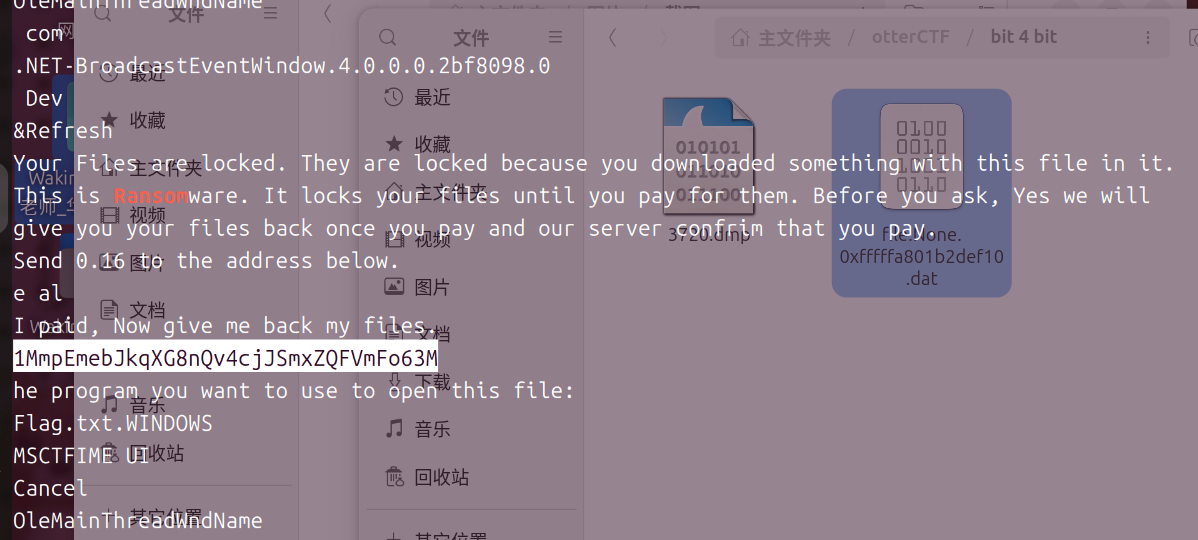
CTF{1MmpEmebJkqXG8nQv4cjJSmxZQFVmFo63M}
将恶意文件下载到本地
vol.py -f OtterCTF.vmem  --profile=Win7SP1x64 filescan | grep vmware
vol.py -f OtterCTF.vmem  --profile=Win7SP1x64 dumpfiles -Q 0x000000007daad840 -D ./vmware/
直接用detect查一下
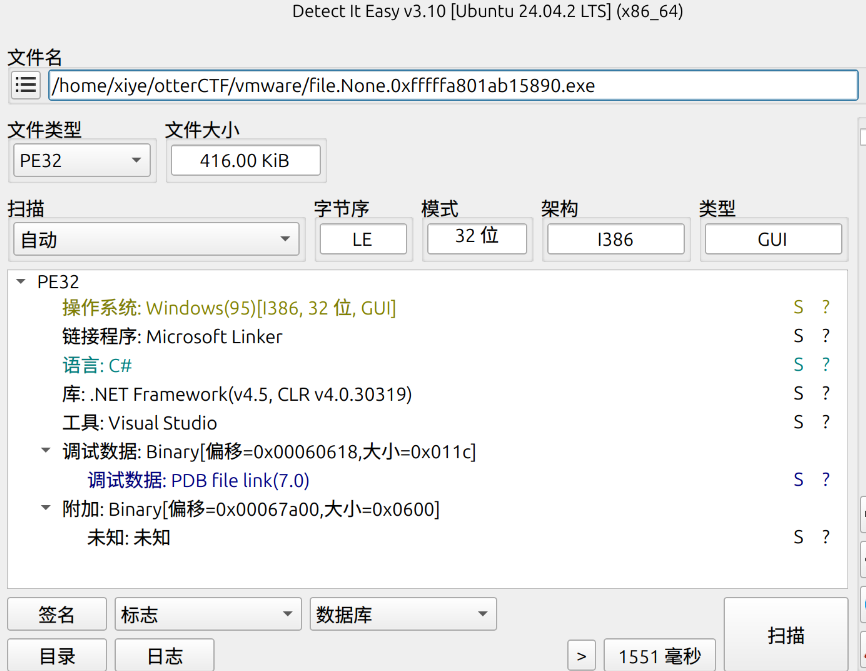
发现是C#写的,用dnSpy反编译看
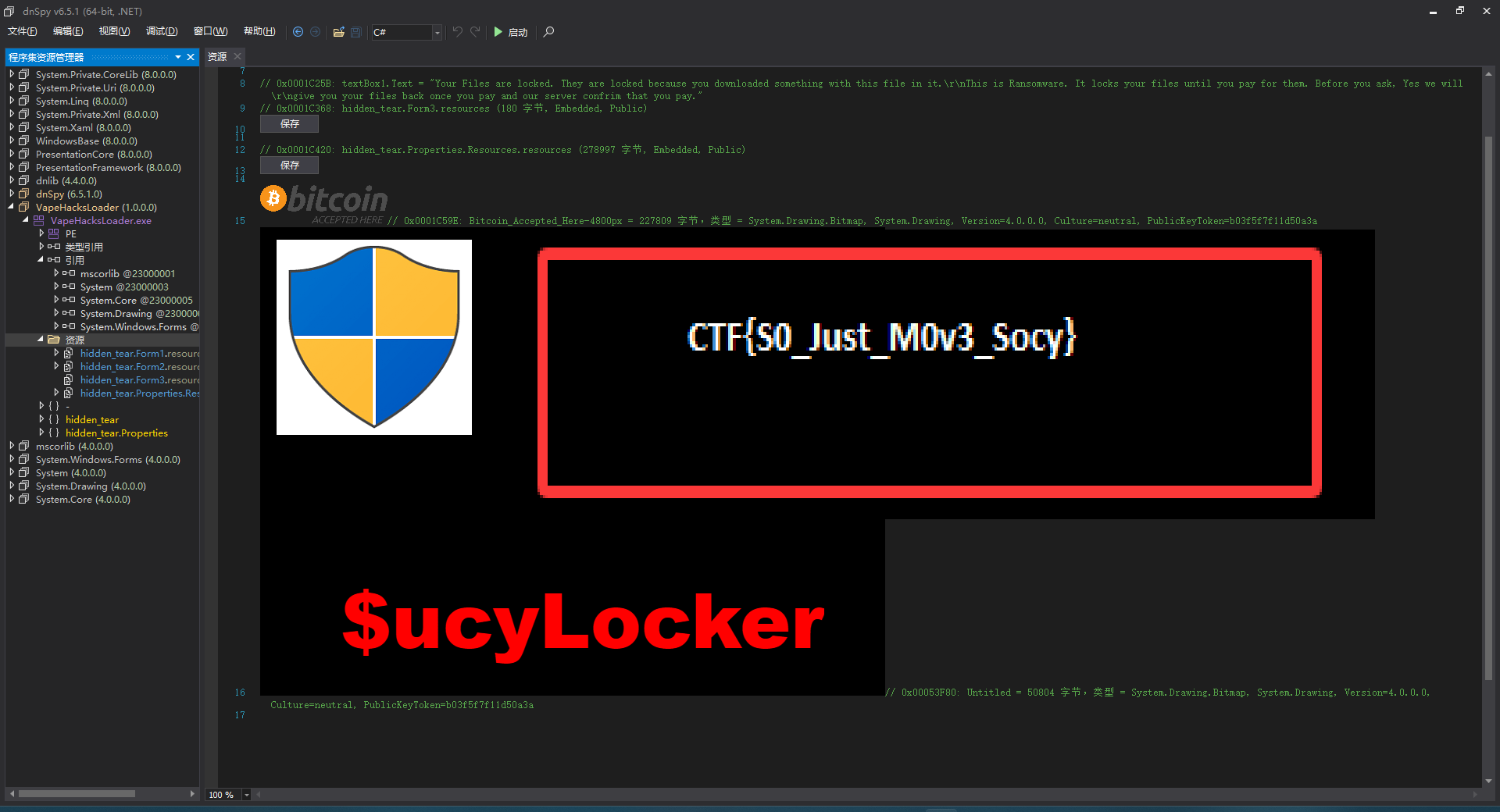
直接得出flag
CTF{S0_Just_M0v3_Socy}
-
12 - Recovery
Rick got to have his files recovered! What is the random password used to encrypt the files?
里克终于恢复了文件!用来加密文件的随机密码是什么?
找到找到两个函数 CreatePassword SendPassword
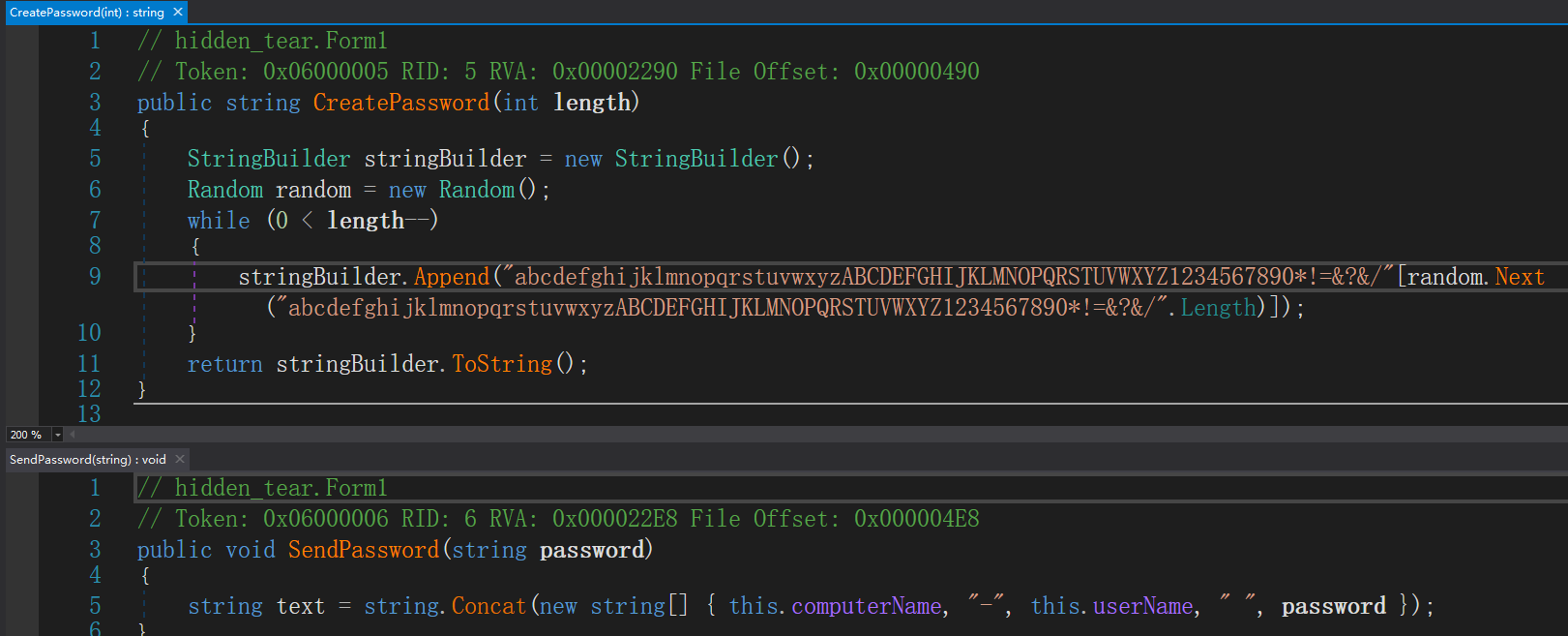
可以看出,SendPassword函数与计算机名、用户名拼接发送,直接用strings搜恶意文件的内存文件
strings -el bit\ 4\ bit/3720.dmp | grep WIN-LO6FAF3DTFE-Rick
得到密码aDOBofVYUNVnmp7

-
13 - Closure
Now that you extracted the password from the memory, could you decrypt rick’s files?
既然你已经从内存中提取了密码,你能解密Rick的文件吗?
搜索Desktop中的Flag文件
vol.py -f OtterCTF.vmem --profile=Win7SP1x64 filescan | grep Desktop
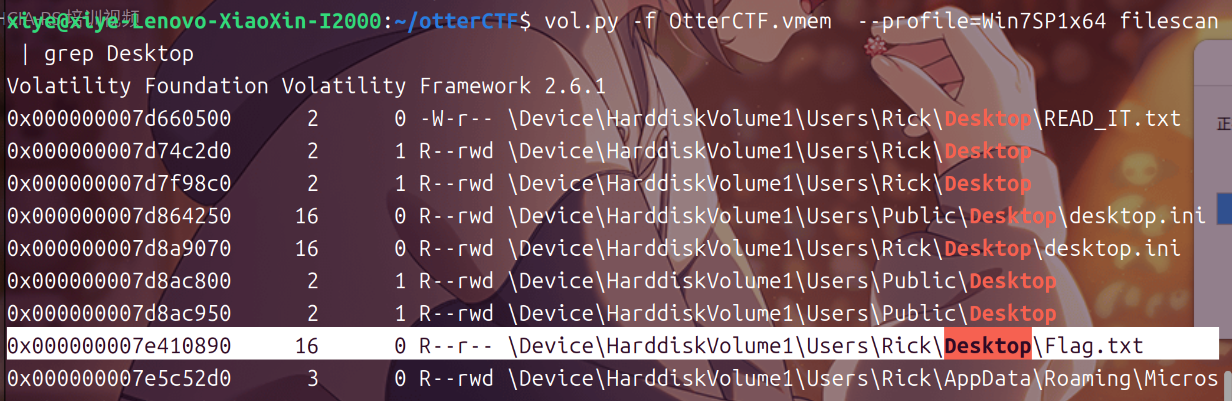
导出到本地
vol.py -f OtterCTF.vmem --profile=Win7SP1x64 dumpfiles -Q 0x000000007e410890 -D ./flag/
从网上搜到,这个恶意软件就是HiddenTear勒索软件,使用HiddenTearDecrypter进行解密即可
首先用010editor将后面的00全部删除,然后改名为flag.locked
使用HiddenTearDecrypter进行解密
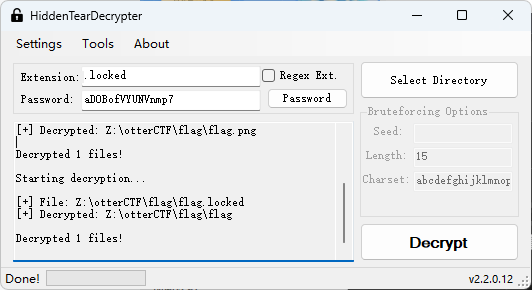
Password上一题得到了,Selet Directory选择flag.locked所在的文件夹
点击Decrypt解密
后用010editor查看

得到flag
CTF{CTF{Im_Th@_B3S7_RicK_0f_Th3m_4ll}}
说些什么吧!